



















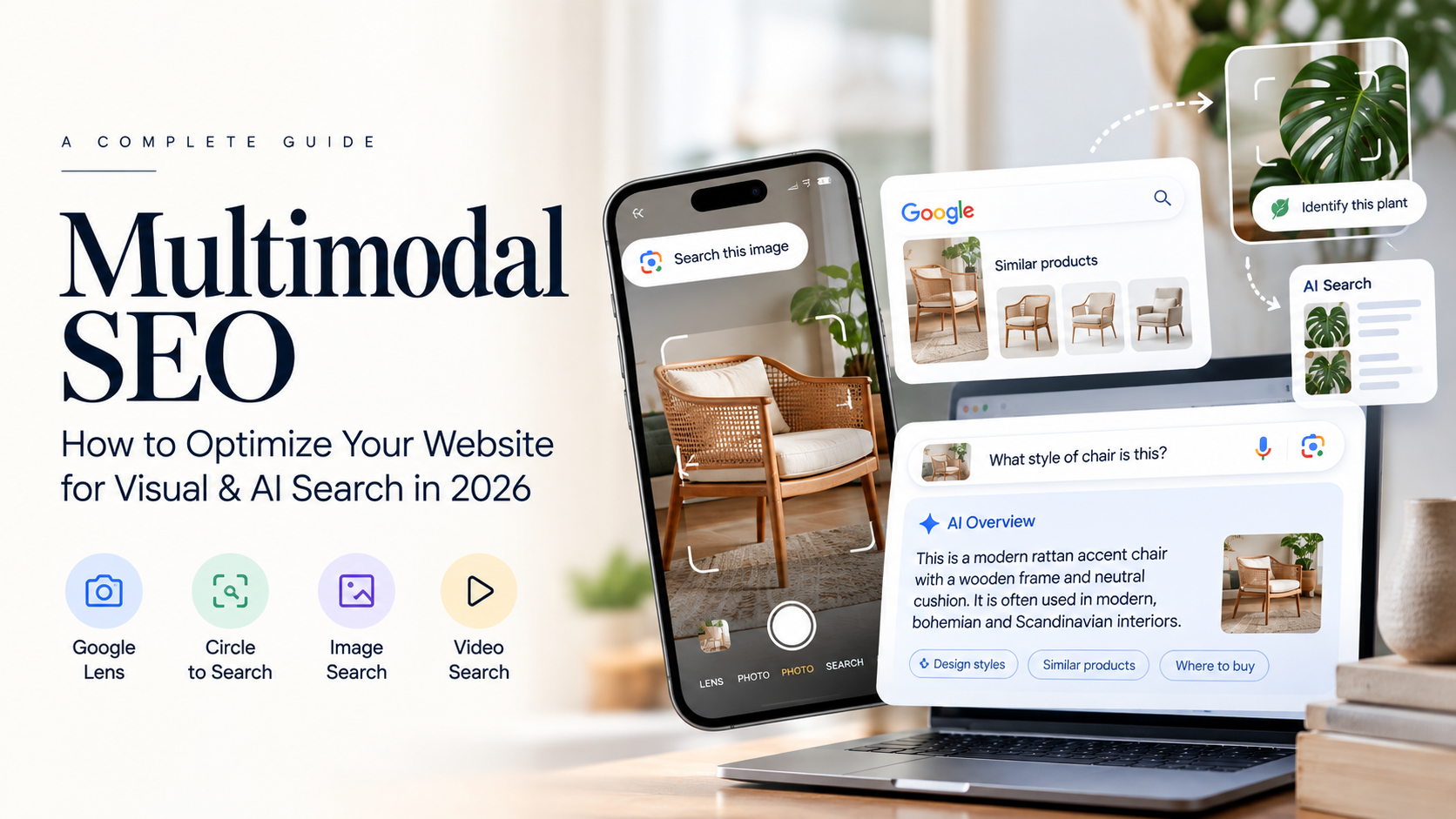
Search is no longer limited to typing keywords into a search box.
Users can now take a photograph, upload an image, circle something on their screen, ask a question about a product, or combine text and visual information to find what they need.
This shift is creating a new opportunity for businesses:
Multimodal SEO.
Google’s Search ecosystem increasingly supports searches that combine different types of information, including text, images and other visual inputs. In September 2026, Google introduced a new multimodal search performance filter in Search Console, covering searches through Google Lens, Circle to Search on Android, image uploads to Google Search and Chrome’s “Search this image” functionality.
For businesses, this means SEO can no longer be treated as a purely text-based activity.
Your:
- Images
- Videos
- Product photos
- Graphics
- Infographics
- Business information
- Product descriptions
- Page content
can all contribute to how users discover your website.
So what exactly is Multimodal SEO, and how can you prepare your website?
What Is Multimodal SEO?
Multimodal SEO is the practice of optimizing website content so that it can be discovered and understood through search experiences involving multiple types of inputs, such as text, images, video and visual context.
Traditional SEO might look like:
Keyword → Search → Webpage
Multimodal search can look more like:
Image → AI/Search understanding → Relevant information → Website
Or:
Image + Question → AI Search → Answer + Sources
For example, a user could photograph a piece of furniture and ask:
“What style of furniture is this and where can I find something similar?”
Or photograph a plant and ask:
“What plant is this and how should I care for it?”
Or upload a product image and ask:
“Find similar products under ₹5,000.”
These are fundamentally different search behaviors from traditional keyword searches.
Google has specifically highlighted multimodal search as an area where websites can support their textual content with high-quality images and videos.
Why Multimodal SEO Matters in 2026
Search is becoming more visual and conversational.
Google’s current AI Search guidance says users can perform multimodal searches by taking or uploading an image, asking a question about it and receiving a response with links for further exploration.
Google has also now added multimodal-search data to Search Console’s performance reporting.
This is important because marketers can increasingly ask:
- Are users discovering our website through images?
- Which pages receive multimodal-search impressions?
- Which visual content generates traffic?
- Which products are being discovered visually?
- Are our images supporting AI Search visibility?
This turns visual SEO from something many businesses treat as secondary into something that can be measured.
Multimodal Search vs Traditional Search
| Traditional Search | Multimodal Search |
|---|---|
| Primarily text-based | Text + image + visual inputs |
| Keyword-focused | Context-focused |
| User describes what they want | User can show what they want |
| Text results are central | Images, video and visual information become important |
| Search starts with words | Search can start with an image |
| Example: “black leather sofa” | Photograph of a sofa + “find similar styles” |
This doesn’t mean traditional SEO is disappearing.
Google explicitly says its generative AI Search experiences are rooted in core Search ranking and quality systems, so SEO fundamentals continue to matter.
The change is that more types of content can participate in discovery.
How Google Multimodal Search Can Discover Your Content
Multimodal search can involve several Google experiences.
Google Lens
Users can search using their camera or an image.
For businesses, this can create opportunities for:
- Products
- Places
- Objects
- Visual guides
- Educational content
- Lifestyle content
Circle to Search
Users can select something visible on their screen and search for information about it.
This can be particularly relevant to:
- Fashion
- Products
- Travel
- Food
- Architecture
- Interior design
- Retail
Image Uploads
Users can upload an image to Google Search and ask questions about it.
The more context your website provides around relevant visual content, the easier it can be for search systems to understand the page and its purpose.
Search This Image
Users can right-click an image in Chrome and search for it.
This creates another pathway through which images can lead users back to web content.
Google’s September 2026 Search Console update specifically includes this type of search in its multimodal reporting.
10 Ways to Improve Multimodal SEO
1. Use High-Quality Original Images
Don’t rely entirely on generic stock photography.
Where possible, use:
- Original product photographs
- Original project images
- Before-and-after visuals
- Screenshots
- Diagrams
- Original infographics
- Real-world photographs
Google’s AI Search guidance recommends supporting textual content with high-quality, relevant images and videos.
For example, a digital marketing agency could show:
Generic:
A stock photo of someone using a laptop.
Better:
A real screenshot of a campaign dashboard with appropriate sensitive information removed.
The second provides actual context.
2. Write Descriptive Image ALT Text
ALT text should explain what the image represents.
Weak:
image1.jpg
Better:
Digital marketing analytics dashboard showing campaign performance
For a product:
Handmade terracotta serving bowl with natural matte finish
The objective isn’t keyword stuffing.
The objective is accurate image description.
3. Use Descriptive File Names
Instead of:
IMG_3847.jpg
use something like:
digital-marketing-analytics-dashboard.jpg
File names are not a magic ranking trick.
But descriptive naming creates clearer context around your visual assets and makes content management easier.
4. Surround Images With Relevant Text
Don’t put an image on a page without explaining what it represents.
For example:
Image
A screenshot of a Google Analytics dashboard.
Supporting text
This dashboard shows how organic traffic changed after the technical SEO improvements were implemented.
The surrounding content provides context.
Google’s AI Search documentation emphasizes making content useful and understandable while supporting textual content with relevant visual assets.
5. Optimize Product Images
For ecommerce businesses, this is particularly important.
Your product pages should contain:
- Clear product photography
- Multiple angles
- Accurate product names
- Descriptions
- Specifications
- Sizes
- Materials
- Pricing where appropriate
- Availability
- Relevant structured data
Google’s 2026 AI optimization guidance specifically includes shopping content among the areas businesses should consider when preparing for generative AI Search.
6. Add Video Where It Provides Real Value
Multimodal SEO isn’t only about images.
Video can provide additional context around:
- Products
- Tutorials
- Demonstrations
- Services
- Locations
- Events
- Processes
For example, instead of a page that only says:
“We provide professional interior design services.”
you could include a short video showing:
Before → Design Process → Final Result
That provides information that text alone cannot communicate as effectively.
7. Keep Your Business Information Consistent
Visual search can lead users into local and commercial journeys.
Make sure important business information is accurate across relevant Google properties.
For local businesses, maintain:
- Business name
- Address
- Phone number
- Opening hours
- Website
- Services
- Photos
Google’s guidance specifically recommends keeping Merchant Center and Business Profile information up to date when preparing for multimodal search.
8. Connect Images to Useful Pages
An image should not exist in isolation.
For example:
Product image
→ Product page
Case-study screenshot
→ Case-study page
Travel photograph
→ Destination guide
Infographic
→ Detailed article
This gives users a path from visual discovery to useful information.
9. Use Structured Data Where Appropriate
Structured data can help search engines understand webpage content and make pages eligible for certain Search features.
Depending on your page, relevant types may include:
- Product
- Organization
- Article
- LocalBusiness
- Breadcrumb
- VideoObject
But structured data should accurately represent visible content.
Google specifically recommends ensuring that information in structured data matches what users can actually see on the webpage.
Schema is context—not a guaranteed multimodal ranking shortcut.
10. Create Visual Content That Answers Questions
This is where Multimodal SEO becomes more strategic.
Don’t ask:
“What image should we add to this article?”
Ask:
“What visual information would actually help someone understand this topic?”
For example:
Topic:
How to Choose a Website Platform
Useful visual content:
- Platform comparison chart
- Architecture diagram
- CMS screenshots
- Feature comparison table
Topic:
Terracotta Pottery Buying Guide
Useful visual content:
- Product photographs
- Size comparison
- Texture close-ups
- Usage examples
Topic:
Digital Marketing Campaign Case Study
Useful visual content:
- Campaign screenshots
- Funnel diagram
- Performance charts
- Creative examples
This is much more useful than adding decorative stock images.
Multimodal SEO for Different Industries
Ecommerce
Focus on:
- Product photography
- Multiple product angles
- Product specifications
- Video demonstrations
- Accurate product data
- Merchant Center
Hospitality
Use:
- Room photographs
- Property videos
- Location imagery
- Amenities
- Maps
- Experiences
- Food photography
Real Estate
Visual search can be especially relevant to:
- Property photographs
- Floor plans
- Architecture
- Interior design
- Neighborhood visuals
- Before/after renovations
Healthcare
Use appropriate visual content such as:
- Educational diagrams
- Treatment illustrations
- Procedure explanations
- Infographics
- Facility photographs
Medical content should be particularly careful about accuracy, sourcing and professional review.
Travel
Useful visual content includes:
- Destination photographs
- Hotel rooms
- Attractions
- Maps
- Activities
- Videos
- Itinerary visuals
Multimodal SEO and AI Search
Multimodal search isn’t separate from AI Search.
They’re increasingly connected.
Google’s AI Search guidance explains that its generative AI experiences can use relevant web content retrieved from Google’s Search index to help generate responses. It also specifically recommends high-quality images and videos for multimodal success.
This creates a broader content model:
Text
Images
Video
Structured Data
Business Information
=
More complete digital context
The goal isn’t to optimize every individual asset for an algorithm.
The goal is to make your website understandable across different search experiences.
How to Measure Multimodal SEO
This is one of the biggest changes in 2026.
Google Search Console now has a multimodal search type filter in its performance reporting. Google says the reporting includes multimodal searches involving Lens, Circle to Search, image uploads and “Search this image.”
You can use the data to investigate:
Impressions
How often your content appeared for these searches.
Clicks
How many users visited your website.
Pages
Which URLs receive multimodal-search visibility.
Queries
Where available, identify the search behavior driving discovery.
Countries
Understand where visual discovery is happening.
Generative AI Features
Google has also integrated multimodal information into its reporting for generative AI features.
A Simple Multimodal SEO Audit
Use this checklist on your website.
Images
- Images are relevant
- Images are high quality
- Images are original where possible
- File names are descriptive
- ALT text accurately describes images
- Images are properly compressed
- Important images aren’t unnecessarily blocked
Content
- Images have relevant surrounding text
- Visuals add useful information
- Product information is complete
- Videos support the page topic
- Important information isn’t communicated visually only
Technical SEO
- Pages are crawlable
- Images can be accessed
- Pages are indexable
- Mobile experience works properly
- Structured data is accurate
- Canonical URLs are correct
Business
- Google Business Profile is accurate
- Merchant Center data is accurate where relevant
- Product information is consistent
- Contact information is clear
Measurement
- Search Console is connected
- Multimodal search data is monitored
- Important pages are tracked
- Image-driven traffic is analyzed
Common Multimodal SEO Mistakes
Mistake 1: Using stock images everywhere
Stock images can support a page, but they rarely provide unique business information.
Mistake 2: Keyword stuffing ALT text
ALT text should describe the image, not become a list of keywords.
Mistake 3: Ignoring product information
A beautiful product image isn’t enough if the page doesn’t explain the product.
Mistake 4: Uploading huge images
Large image files can hurt page performance.
Mistake 5: Treating visuals as decoration
A visual should ideally contribute information or improve understanding.
Mistake 6: Forgetting mobile users
Many visual searches begin on smartphones.
Your visual content needs to work well on smaller screens.
Is Multimodal SEO a Replacement for Traditional SEO?
No.
It is an extension of a broader SEO strategy.
Google’s official guidance continues to say that foundational SEO remains relevant for generative AI Search. Crawlability, indexing, useful content, page experience and technical accessibility still matter.
Think of it this way:
Traditional SEO
→ Helps search engines discover and understand your website.
Image SEO
→ Helps search engines understand your visual content.
Video SEO
→ Helps users discover your video content.
Multimodal SEO
→ Helps your overall content ecosystem participate in search experiences that combine different forms of information.
The Future of Search Is Multimodal
Search began with keywords.
Then it expanded into:
Text → Voice → Images → Video → Conversational AI → Multimodal Search
Now users don’t always need to know exactly what something is before searching for it.
They can simply show it.
They can photograph a product.
Upload a screenshot.
Circle something on their screen.
Ask a question about an image.
Then follow the AI-generated response to relevant websites.
For businesses, that means the question is changing from:
“What keywords should we rank for?”
to:
“Can people discover and understand our business through the different ways they search?”
That is the opportunity behind Multimodal SEO.
Final Takeaway
Multimodal SEO is the next layer of modern search optimization.
It doesn’t mean abandoning keywords, written content or traditional SEO.
Instead, it means expanding your strategy to include the visual and multimodal ways people increasingly use Search.
Focus on:
Useful content + original visuals + strong image SEO + video + accurate product/business information + technical SEO + measurement.
Google’s latest Search Console update makes this shift particularly important: website owners can now see performance data from multimodal searches including Lens, Circle to Search, image uploads and “Search this image.”
The brands that treat images and video as meaningful search assets—not just decoration—will be better prepared for how people discover information in 2026 and beyond.
FAQs
What is Multimodal SEO?
Multimodal SEO is the practice of optimizing website content for search experiences that combine different inputs such as text, images and video.
Is Multimodal SEO the same as Image SEO?
No. Image SEO focuses specifically on optimizing images, while Multimodal SEO considers how images, text, video, products and other content work together across modern search experiences.
Does Google support multimodal search?
Yes. Google supports experiences involving visual inputs such as Google Lens, Circle to Search and image uploads. Google added a multimodal search filter to Search Console performance reporting in September 2026.
How do I optimize images for Multimodal SEO?
Use relevant, high-quality images, descriptive filenames, accurate ALT text, useful surrounding content and appropriate technical optimization. Avoid keyword stuffing.
Does Multimodal SEO replace traditional SEO?
No. Google continues to state that foundational SEO practices remain relevant for its AI-powered Search experiences.
Can ecommerce businesses benefit from Multimodal SEO?
Yes. Product photography, detailed product information, videos, Merchant Center data and accurate structured data can all support product discovery across visual and AI-powered search experiences.
How can I track Multimodal SEO performance?
Use Google Search Console’s multimodal search filter to analyze performance from supported visual search experiences. You can also monitor image-driven traffic, conversions and performance of pages containing important visual assets.
STAY IN THE LOOP